Best Webcams for Remote Work
The best webcams for remote work make a laptop call feel more dependable. A separate camera can put you at a better eye line, give a manager or client a clearer view of your face, and free you to use a laptop stand without accepting a camera angle from below. This guide compares five current Amazon options for solo calls, online training, client presentations, and home-office days with mixed lighting.
Quick picks for remote work
| Webcam | Best for | Remote-work fit | Skip it if |
|---|---|---|---|
| Logitech Brio 500 | Most remote calls | Clear 1080p video, a privacy shutter, and framing options fit a typical laptop-and-monitor desk | You need 4K capture or camera tracking |
| Logitech MX Brio | Premium solo video | 4K video and 1080p at up to 60 fps suit client-facing work and a well-lit permanent desk | A 1080p call camera is enough |
| EMEET SmartCam C960 4K | A focused desk view | A 73-degree view, 4K capture, autofocus, and a physical cover suit one person at a compact desk | You need a wide group view or tracking |
| OBSBOT Tiny 2 Lite | Calls that involve movement | The pan-and-tilt camera with AI tracking can follow a trainer or presenter away from the chair | You stay seated in the same place for every call |
| Insta360 Link 2 | Training and client demos | A two-axis gimbal, desk and whiteboard modes, and 4K video help when the camera needs to show more than a face | You only join ordinary sit-down meetings |
What a remote-work webcam needs to solve
A webcam is not only about resolution. A strong remote-work choice needs to sit securely on a monitor or laptop, work with the meeting app your team uses, and frame the part of your workspace that matters. A camera with a very wide view can be useful for a shared room, but it can also reveal a busy background on a solo call. A tighter view often looks cleaner from a small home-office desk.
Privacy is another practical decision. A physical shutter or cover gives contractors and freelancers a quick visual check that the camera is blocked between calls. It is not a substitute for software permissions, but it can be reassuring on a laptop that stays connected to a monitor all day.
Match resolution to the call platform
Most meeting platforms compress video, so 4K does not guarantee every attendee receives a 4K picture. Its real value for remote work is often flexibility. A higher-resolution camera can leave more detail for a crop, a wider desk view, or a recorded training session. A well-positioned 1080p camera is still the sensible choice for a recurring stand-up, interview, or one-to-one call.
Put the camera at a useful height
Set the webcam close to eye level before buying a larger camera or a desk light. A monitor-mounted webcam usually looks better when the display is raised, but that may call for a separate keyboard and mouse. Our laptop stands for remote work guide can help you build that part of the desk without turning a simple call setup into a cable mess.
Keep audio separate from video when needed
Built-in webcam microphones are convenient for a short call in a quiet room. A headset is usually the safer tool for a shared home, a busy coworking space, or a client call where keyboard noise and room echo can get in the way. See our best headsets for remote work when the other person needs to hear you as clearly as they see you.
Our top webcams for remote work
Logitech Brio 500 for most remote calls
Check the Logitech Brio 500 on Amazon

The Logitech Brio 500 is the best overall choice here for a remote worker who wants a clear, uncomplicated work camera. Logitech lists 1080p video at 30 frames per second, autofocus, a built-in privacy shutter, stereo microphones, and 65-, 78-, and 90-degree framing choices. That range gives a freelancer more control over how much of a home office appears behind them on a client call.
Buy it if you spend most of the day seated at one desk and want a dedicated webcam without a long setup routine. The shutter and adjustable field of view are especially useful for a monitor that stays connected after work.
Skip it if 4K recording, fast 1080p capture, or camera tracking is part of the job. A product demo, course recording, or presentation that moves beyond a head-and-shoulders frame may justify one of the 4K cameras below.
Logitech MX Brio for premium solo video
Check the Logitech MX Brio on Amazon

The Logitech MX Brio suits remote professionals whose camera is part of their client-facing work. Logitech specifies 4K at up to 30 frames per second and 1080p at up to 60 frames per second, with a Sony STARVIS sensor, a 90-degree field of view, and dual beamforming microphones. Those details make it a better fit for a permanent desk with decent light than a basic camera picked only for occasional team calls.
Buy it if you run client workshops, record short updates, or want more room to crop a 4K image without moving the camera close to your face. The USB-C connection also fits many newer laptop and dock setups.
Skip it if your calls live in a compressed 1080p meeting window and you rarely record video. The Brio 500 keeps the important remote-work basics while asking less of the budget.
EMEET SmartCam C960 4K for a focused desk view
Check the EMEET SmartCam C960 4K on Amazon

EMEET's SmartCam C960 4K is a useful pick for a single remote worker who does not need the widest possible frame. Its manufacturer specifications list 4K at 30 frames per second, a 73-degree field of view, PDAF autofocus, dual omnidirectional microphones, a physical privacy cover, and a tripod thread. That narrower view can keep a compact work area out of a call without relying on a heavy crop.
Buy it if you work from a small desk and want a 4K camera that can stay focused on one person. The physical cover and tripod thread also suit a freelancer who moves the camera between a monitor and a short presentation setup.
Skip it if two people need to sit in the frame or you walk around while teaching. Its focused field of view is a strength for solo work, not a replacement for a camera that pans and follows a presenter.
OBSBOT Tiny 2 Lite for active presentations
Check the OBSBOT Tiny 2 Lite on Amazon
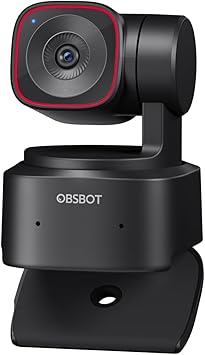
The OBSBOT Tiny 2 Lite is the pick for an online instructor, recruiter, or consultant who does not stay still through a full call. OBSBOT lists a 1/2-inch CMOS sensor, 4K video, pan-and-tilt movement, AI tracking with auto zoom, preset modes, and gesture control. The tracking can keep a presenter in frame while they move from a desk to a whiteboard or show a physical sample.
Buy it if your remote work includes live training, product walk-throughs, or sessions where you stand and move. Presets can also reduce the friction of switching between a face view and a wider demonstration view.
Skip it if every call happens from one chair. A tracking camera adds cost and software controls that do not bring much value to a steady, monitor-level video call.
Insta360 Link 2 for training and client demos
Check the Insta360 Link 2 on Amazon

The Insta360 Link 2 gives online trainers and consultants a more flexible camera role than a fixed webcam. Insta360 specifies a 1/2-inch sensor, 4K video at up to 30 frames per second, 1080p at up to 60 frames per second, a two-axis gimbal, AI tracking, and dedicated desk and whiteboard views. Those modes can help when a video call needs to include notes, a sketch, or a physical document without balancing a laptop over the work surface.
Buy it if you teach, present, or review physical work with clients from a home office. The gimbal and alternative views are useful when a normal face camera would force you to keep changing the monitor position.
Skip it if a fixed 1080p camera covers all of your meetings. The Link 2 makes the most sense when the camera needs to tell more of the work story than a standard conversation does.
Choose based on the work you show
Choose the Brio 500 for dependable daily calls and a privacy shutter. Choose the MX Brio when higher-resolution solo video supports client work or recorded updates. The EMEET C960 4K suits a focused desk view with a physical cover. Pick the OBSBOT Tiny 2 Lite or Insta360 Link 2 only when tracking, presentation views, or movement are part of the work.
A webcam needs a clean connection path too. Our USB-C hubs for remote workers can help when one laptop port has to handle a camera, charging, display, Ethernet, and accessories. Check whether the webcam uses USB-A or USB-C before you choose a hub or adapter.
Use a simple pre-call checklist
Open the meeting preview and check the frame at the time of day you usually meet. Close blinds or turn on a desk light before judging a camera's low-light performance. Turn the physical shutter or cover on and off once to make sure it fits your routine, then test the microphone with the same headset or speaker setup you use in real calls.
Remote-job interviews are a good time to make that check. Build the rest of the application with the resume builder, then leave enough time before the interview to test the camera, audio, and meeting link without rushing.
Frequently asked questions
Is a 4K webcam worth it for remote work
It can be worth it when you record training, run client demos, or want room to crop a wider image. For ordinary team meetings, a well-positioned 1080p webcam is often enough because call platforms may limit the stream resolution.
What webcam field of view works best for a home office
A 65- to 78-degree view often works well for one person at a desk because it keeps more of the room out of frame. A 90-degree view gives more flexibility for a whiteboard, a second person, or a wider desk, but it may show more background than you want.
Do I need a webcam with a privacy shutter
It is a useful feature for a remote-work desk, especially when the webcam stays connected to a monitor all day. A shutter or physical cover provides a clear visual signal that the lens is blocked between calls.
Can I use a webcam with a laptop stand
Yes. A separate webcam is often helpful with a laptop stand because the laptop camera may sit too high, too low, or too far away after you adjust the screen. Place the webcam near eye level and use a separate keyboard and mouse when the laptop is raised.
Which webcam is best for remote work
The Logitech Brio 500 is the best fit for most remote workers because it covers daily 1080p calls, adjustable framing, and privacy. The MX Brio is the better premium solo option, while the OBSBOT Tiny 2 Lite and Insta360 Link 2 are better matches for people who teach, demonstrate, or move during calls.
Put the webcam into a practical job-search setup
Your camera does not need to turn a home office into a studio. It needs to help a remote colleague, client, or interviewer see you clearly while you focus on the conversation. Set it at eye level, test the frame and audio, then browse remote jobs when the setup is ready for the next opportunity.
Publishing Articles or Documentation? Remove AI Slop.
Remove repetitive AI filler phrases, robotic patterns, and AI slop to make your content human, engaging, and original.
Applying for Universal Remote Professional Roles?
Boost your callback rate with our 100% free ATS-optimized resume template tailored specifically for remote Universal Remote Professional positions.
Classic ATS-Friendly Standard Resume Template
A pure single-column structure with standard semantic headings (Summary, Experience, Skills, Education) that passes every automated applicant scanner.
ATS Keyword Scanner
Check your resume against remote job descriptions to find missing keywords and boost your score.
Tailored Cover Letter
Generate a personalized, high-converting remote cover letter emphasizing async communication.