Best USB-C Hubs for Remote Workers
A USB-C hub is easy to dismiss until a remote workday asks one laptop port to handle a display, webcam, wired network, storage drive, and charging cable at once. The best USB-C hubs for remote workers keep a home desk or travel setup usable without turning every meeting into a cable swap.
Quick picks for remote work
| Hub | Best for | Why it fits remote work | Skip it if |
|---|---|---|---|
| Anker 8-in-1 USB-C Hub | Most home-office desks | Ethernet, display output, fast data ports, and card readers in one unit | You need two external displays from one hub |
| UGREEN Revodok 6-in-1 | Lighter travel setups | A compact mix of HDMI, Ethernet, USB-A, and pass-through power | You need card readers or many peripherals |
| Plugable 9-in-1 USB-C Hub | High-power laptop setups | Up to 140W pass-through and 10Gbps data ports suit a busy desk | Your charger supplies less power and you only need basics |
| Plugable 7-in-1 DisplayLink Dock | Two-screen remote work | Dual 4K display support with data, Ethernet, and charging | You do not want to install DisplayLink software |
| Belkin 8-in-1 Dual Display Hub | A tidy dual-display desk | Two-display support and a built-for-desk port mix | Your laptop does not support the display mode you need |
| Belkin 6-in-1 Hub with Mount | Small desks and monitor arms | Its mount can keep cables near the screen instead of across the desk | You need a portable hub for a bag |
What a remote worker needs from a USB-C hub
The right port list depends on the way you work, not on the biggest number printed on a box. A consultant who plugs into a conference-room display needs reliable HDMI and power delivery. A developer with a home desk may care more about Ethernet, fast storage, and a second screen. A freelancer moving between a kitchen table, coworking space, and client office usually benefits from a smaller hub with fewer cables.
Match the hub to your meeting setup
Start with the display you use for calls. HDMI is enough for one external screen, while a two-screen desk needs a hub and laptop that support the required display mode. Check the laptop's own display limits before you buy. A hub cannot create a second independent display if the computer does not support it.
Wired Ethernet deserves a place on a fixed home desk. It will not fix every video-call problem, but it removes one variable when Wi-Fi is busy. If you use a USB webcam, headset dongle, or microphone, count those ports too. An adapter that looks generous can fill up quickly.
Treat power delivery as a system
Power delivery is pass-through capacity, not a promise that every laptop will charge at its full rated speed. Your charger, cable, laptop, and hub all set the result. Pick a hub with enough headroom for your computer and use the charger that came with it or one with comparable output.
Our top picks for remote work
Anker 8-in-1 USB-C Hub for most remote desks
Check the Anker 8-in-1 USB-C Hub on Amazon
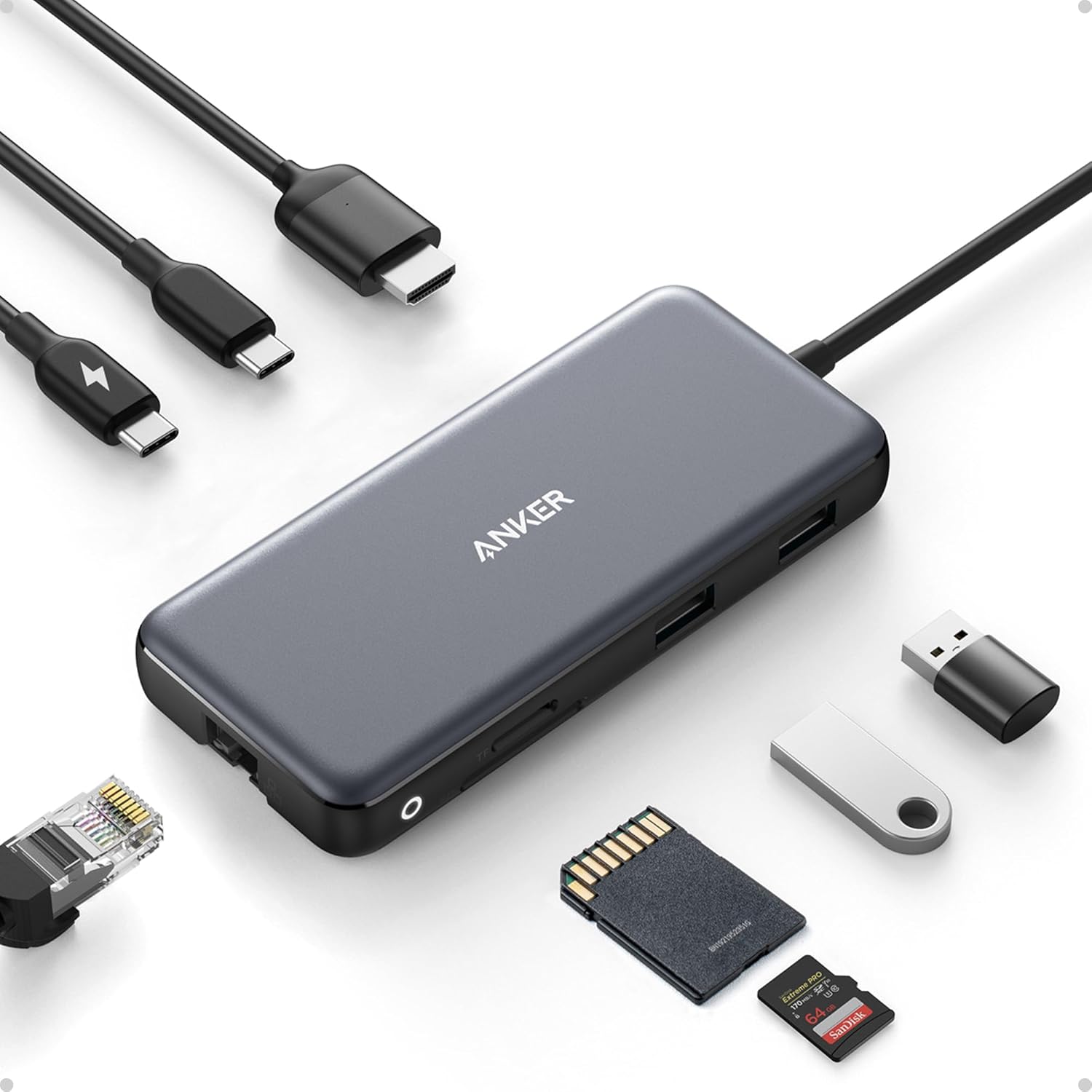
The Anker 8-in-1 is the sensible starting point for a remote desk that needs a display, wired network, charging, and room for common accessories. Its listing includes 4K at 60Hz HDMI, Ethernet, a USB-C data port, two USB-A data ports, microSD and SD readers, and up to 85W pass-through power.
Buy it if one monitor, a webcam or headset receiver, and a dependable wired connection cover most of your workday. The 10Gbps data ports are useful when project files live on an external drive. It also keeps the port mix practical instead of forcing you to add a second adapter for card readers.
Skip it if your desk needs two external displays from the same hub. You should also check the power needs of a larger laptop before relying on its 85W rating.
UGREEN Revodok 6-in-1 for lighter travel setups
Check the UGREEN Revodok 6-in-1 USB-C Hub on Amazon

The UGREEN Revodok 6-in-1 makes more sense when your work kit has to fit in the same bag as the laptop. It combines HDMI, Gigabit Ethernet, USB-A data ports, and up to 100W pass-through charging without the card-reader and extra-port bulk of a desk-first hub.
Buy it if you regularly work from client sites, coworking spaces, or short-term rentals and need a single adapter for a monitor, a wired connection, and a few accessories. The trim port selection keeps setup simple at a temporary desk.
Skip it if a camera card reader or several drives stay connected all day. A larger hub is easier to live with once your desk has a permanent keyboard, webcam, and storage drive.
Plugable 9-in-1 USB-C Hub for high-power laptop setups
Check the Plugable 9-in-1 USB-C Hub on Amazon

The Plugable 9-in-1 is the stronger fit for remote workers who connect fast drives, wired Ethernet, a display, and high-wattage charging at the same desk. The listing pairs 140W pass-through charging with 10Gbps data, 4K at 60Hz HDMI, Gigabit Ethernet, and an SD card slot.
Buy it if video projects, large client files, or a power-hungry laptop make a basic dongle feel cramped. The extra charging headroom is useful only when the rest of your power setup can supply it, but the 10Gbps ports help even when it cannot.
Skip it if your laptop and charger use modest power and you only connect a monitor and mouse. Paying for high-wattage capacity makes little sense when it will sit unused.
Plugable 7-in-1 DisplayLink Dock for two-screen work
Check the Plugable 7-in-1 DisplayLink Dock on Amazon

The Plugable 7-in-1 DisplayLink Dock is the specialist choice for remote workers who need two external displays and work across macOS or Windows. Its Amazon listing includes dual 4K at 60Hz HDMI, 10Gbps USB-C and USB-A, SD, Gigabit Ethernet, and up to 100W charging.
Buy it if spreadsheets, source code, dashboards, or client documents need room beside your meeting window. The combination of two display outputs and Ethernet suits a fixed desk where the hub stays connected.
Skip it if you want a plug-and-play travel accessory. DisplayLink setups require software, and that extra layer is not worth it for a single-screen desk or locked-down work computer.
Belkin 8-in-1 Dual Display Hub for a tidy home office
Check the Belkin 8-in-1 Dual Display Hub on Amazon

Belkin's 8-in-1 Dual Display Hub is aimed at a laptop that becomes a full desk setup after work starts. The listing calls out dual-display support for MacBook, Windows, and Chromebook laptops, with a connection mix designed to expand a home office.
Buy it if your workday begins with plugging one cable into a laptop and ends with two screens, a keyboard, and other desk accessories ready to go. It is a good match for analysts, recruiters, and remote engineers who want their laptop to disappear into a stable desk routine. Remote engineering salary data can help frame a bigger equipment budget around the work you do.
Skip it if you only need a compact adapter for presentations. Confirm your exact laptop's display support before choosing any dual-display hub, especially on systems with platform-specific external-monitor limits.
Belkin 6-in-1 Hub with Mount for smaller desks
Check the Belkin 6-in-1 Hub with Mount on Amazon
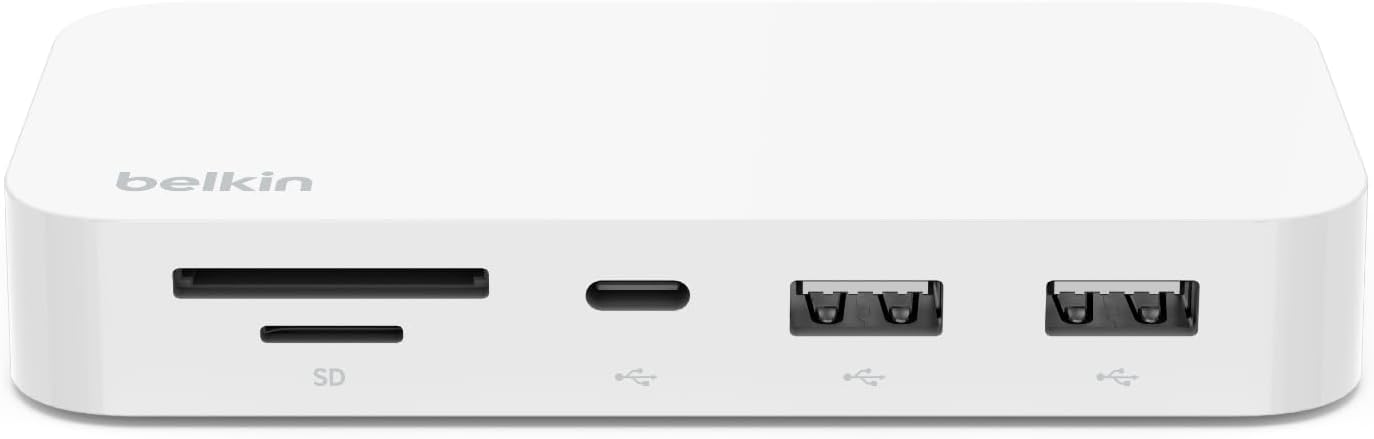
The Belkin 6-in-1 Hub with Mount has a different job from a conventional dongle. It attaches near a monitor, which can keep a compact desk clearer when the laptop sits on a stand and peripherals need to stay within reach.
Buy it if your remote desk has little spare surface area or a monitor arm creates an awkward cable path. The mounted layout is especially useful for a webcam, keyboard receiver, and drive that you plug in often.
Skip it if the hub needs to travel with you. A mounted hub works best as part of one desk, and it is less flexible when you change workspaces every day.
Choose the port mix before the brand
One good hub is usually better than a chain of adapters. List the equipment connected during a typical remote day, then add one spare data port for the accessory you forget about until a deadline. That small check prevents the common mistake of buying a display adapter that leaves no place for a headset receiver.
If remote interviews or client calls matter more than screen count, pair the hub with a call-focused audio option from our remote work headset guide. A good hub keeps your workstation connected; it does not replace a microphone that makes your voice clear.
Budget also matters. A remote setup should support paid work rather than become a pile of upgrades. Use the salary calculator to put a larger desk purchase in context, then browse remote roles when you are ready to put the setup to use.
Frequently asked questions
Can a USB-C hub run two monitors for remote work
Sometimes. The hub, operating system, cable, and laptop all have to support the display mode you want. A DisplayLink dock can add options on supported systems, but it requires software. Check your exact computer before buying.
Is Ethernet worth using for video calls
It can be. A wired connection removes Wi-Fi interference from the path between your laptop and router, which is useful for long calls, uploaded files, and screen sharing. It cannot compensate for a slow internet plan or a weak connection upstream.
Does a USB-C hub charge a laptop
Many hubs pass power from your USB-C charger to the laptop. The actual charging level depends on the hub, charger, cable, and laptop. Match the hub's power-delivery capacity to your computer's needs rather than treating the largest number as a guarantee.
What is the best USB-C hub for remote workers
The Anker 8-in-1 is the best all-around choice for a one-monitor home desk with Ethernet and several accessories. Choose the UGREEN Revodok 6-in-1 for a lighter travel kit, or the Plugable DisplayLink Dock when two external screens are a requirement.
Publishing Articles or Documentation? Remove AI Slop.
Remove repetitive AI filler phrases, robotic patterns, and AI slop to make your content human, engaging, and original.
Applying for Senior Backend Engineer Roles?
Boost your callback rate with our 100% free ATS-optimized resume template tailored specifically for remote Senior Backend Engineer positions.
Remote Backend Engineer Resume Template
Focused on API throughput, database scaling, data modeling, and fault tolerance for distributed systems.
ATS Keyword Scanner
Check your resume against remote job descriptions to find missing keywords and boost your score.
Tailored Cover Letter
Generate a personalized, high-converting remote cover letter emphasizing async communication.