Best Headsets for Remote Work

A bad microphone can ruin a good remote call. Your words blur, background noise takes over, and the meeting starts to feel harder than the work itself.
The right headset fixes that quickly. It keeps your voice clear, cuts the noise around you, and stays comfortable through long calls. The best pick depends on where you work, how often you speak, and whether you care more about meetings, focus time, or travel.
Use this guide to narrow the choice. Start with the quick picks, then read the product notes for the tradeoffs that matter before you buy.
Quick picks
| Pick | Best for | Why it makes sense | Skip it if |
|---|---|---|---|
| Jabra Evolve2 65 | Most remote workers | Strong call-first design with a boom mic, USB dongle, and long battery life | You need active noise cancellation |
| Poly Voyager Focus 2 | Noisy homes and shared spaces | Boom mic, active noise cancellation, and a business-call fit | You want the lightest headset possible |
| Logitech Zone 305 | Lightweight business calls | Low weight, native Bluetooth, and broad device support | You want stronger music performance |
| Sony WH-1000XM5 | Focus time plus calls | Excellent noise control, long battery life, and better audio for music | You want a visible boom mic |
| Bose QuietComfort Ultra | Premium noise control | Strong comfort, premium ANC, and a calmer feel for travel | You mainly need a meeting headset |
| Logitech Zone Vibe 100 | Simple Bluetooth calls | Comfortable over-ear design without a big business-headset look | You need a dedicated boom mic |
How to choose a remote work headset
Buy for your worst workday, not your quietest one.
If you only take one or two calls a week from a quiet room, a simple Bluetooth headset can be enough. If you spend hours in Zoom, Google Meet, Teams, client calls, interviews, or sales demos, prioritize microphone quality before anything else.
Pick call clarity before music
Music headphones can sound better than office headsets, but calls are different. A work headset needs to keep your voice clear when your keyboard clicks, a truck passes outside, or someone talks in the next room.
A boom mic usually helps because it sits closer to your mouth. That does not make every boom mic great, but it gives call-focused headsets a real advantage.
Match the headset to your space
Home offices need comfort. Shared apartments need microphone noise control. Coworking spaces need both. Cafes and airports need active noise cancellation, but ANC mostly helps what you hear. It does not automatically fix what everyone else hears from your mic.
Ask one question before you buy. What sound causes the most trouble during your workday?
Check the return policy and device fit
Your laptop, phone, meeting app, and desk setup matter. A USB dongle can be more stable than regular Bluetooth on a busy laptop. Native Bluetooth feels cleaner if you hate losing USB ports.
Check the Amazon listing before you buy. Product bundles change, and some versions include a USB-A dongle, USB-C dongle, charging stand, or case while others do not.
The best headsets for remote work
These picks focus on remote work, not gym use or pure music listening. A good remote-work headset should make calls easier first.
Jabra Evolve2 65 for most remote calls
Check the Jabra Evolve2 65 on Amazon

The Jabra Evolve2 65 is the safest default for people who spend real time on calls. It is a proper business headset with a boom mic, a USB dongle, and a design made for meetings instead of casual listening.
The big reason to buy it is balance. It does not feel as bulky as many call-center style headsets, but it still looks and acts like work gear. The boom mic gives your voice a more direct path than most over-ear music headphones. The battery life also suits long workdays without making you think about charging after lunch.
The Evolve2 65 makes the most sense if your day includes client calls, team standups, interviews, sales conversations, or support work. It also fits people who move between a laptop and phone and want fewer connection headaches.
Skip it if your work area is loud and you need active noise cancellation. The Evolve2 65 is built more around voice pickup and work calls than blocking the room around you. Look at the Poly Voyager Focus 2 or a premium ANC headphone if that matters more.
Poly Voyager Focus 2 for noisy homes and shared spaces
Check the Poly Voyager Focus 2 on Amazon

The Poly Voyager Focus 2 is the pick for people who need a stronger wall between work and the room around them. It pairs a boom mic with active noise cancellation, which makes it more useful in shared homes, coworking spaces, or apartments where quiet is not guaranteed.
The headset feels more like serious office equipment than lifestyle headphones. That is a good thing if your headset is part of your job. You get a visible mic, call controls, and a design that tells other people you are probably on a meeting.
Buy it if call quality matters more than style. It is a better fit for account managers, recruiters, customer success teams, managers, consultants, and anyone who talks for a living.
Skip it if you want something minimal for travel or coffee shops. It is still a headset, visually and physically. Some people prefer the cleaner look of Sony or Bose headphones when they work in public.
Logitech Zone 305 for a lighter business headset
Check the Logitech Zone 305 on Amazon

The Logitech Zone 305 is a better fit when you want a business headset without the heavier feel. Logitech lists it at 122 grams, with native Bluetooth support across Windows, Mac, Chrome, Linux, iOS, iPadOS, and Android.
That makes it useful for remote workers who jump between devices and hate desk clutter. It also keeps one USB port free, which matters more than it should on thinner laptops.
The value here is comfort and simplicity. The boom mic gives it a call-first shape, while the lighter frame makes it easier to wear for longer stretches. It is not the most premium headset in this guide, and that is fine. It is for clear calls without turning your desk into a full contact-center setup.
Skip it if you care deeply about music, premium materials, or stronger noise cancellation. The Zone 305 is a practical meeting headset. Treat it that way and it makes more sense.
Sony WH-1000XM5 for focus time and clean calls
Check the Sony WH-1000XM5 on Amazon

The Sony WH-1000XM5 is for remote workers who need one pair of headphones for deep work, travel, and calls. It is not a pure office headset, but it makes a strong case if your day moves between writing, research, meetings, and flights.
The main draw is noise control. Sony lists two processors and eight microphones for its noise-canceling system, along with up to 30 hours of battery life. That gives you a calmer work bubble when the apartment, train, or airport gets loud.
The WH-1000XM5 also makes sense if you listen to music for hours while working. A business headset can handle calls well, but many people do not want to use one for playlists, focus music, or travel.
Skip it if microphone certainty is your top priority. The call quality is good for many remote workers, but a boom mic headset still gives you a more work-specific setup. If your income depends on calls sounding clean every day, Jabra or Poly may fit better.
Bose QuietComfort Ultra for premium noise control
Check the Bose QuietComfort Ultra on Amazon
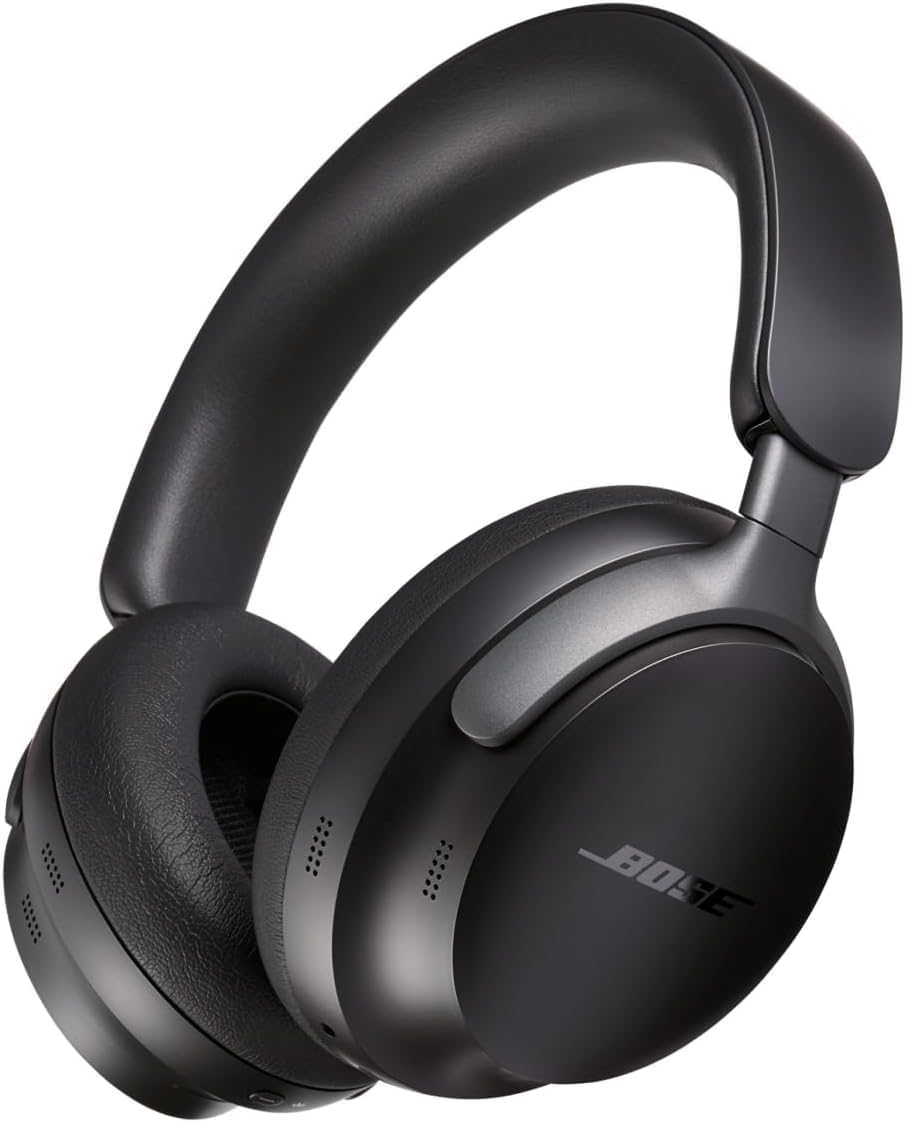
The Bose QuietComfort Ultra is the premium pick for remote workers who care most about comfort and noise reduction. It is built for a calmer listening experience, and that matters when your workspace changes often.
Buy it if you work from airports, trains, hotel rooms, shared spaces, or noisy homes and you want headphones that feel good for long stretches. Bose also lists up to 24 hours of battery life, which is enough for a full workday plus travel time.
The best reason to choose Bose over a business headset is comfort. Some people simply work better in softer, more immersive over-ear headphones. If that helps you stay focused, it can be worth paying more.
Skip it if you mostly sit in meetings and need the clearest possible microphone path. The QuietComfort Ultra can handle calls, but it is not a boom mic work headset. It is premium noise control first.
Logitech Zone Vibe 100 for simple Bluetooth calls
Check the Logitech Zone Vibe 100 on Amazon

The Logitech Zone Vibe 100 is the casual pick. It looks less corporate than the Jabra and Poly options, but it still targets work calls with multipoint Bluetooth and support for common meeting apps.
Buy it if you want one easy pair of over-ear headphones for calls, light focus time, and daily desk use. It is a better fit for people who do not want a visible office headset but still need something more work-friendly than random earbuds.
The tradeoff is microphone strength. A simpler headset can work well in a quiet room, but it is not the pick for loud spaces or high-stakes calls. If you take interviews, client pitches, or recorded calls, move up to a boom mic model.
Skip it if you need active noise cancellation, a USB dongle in the box, or a more premium feel. Keep expectations practical and it becomes a useful lower-pressure option.
Which one should you buy
The best headset is the one that fixes your actual work problem.
When you live on Zoom or Teams
Choose the Jabra Evolve2 65 if you want the safest all-around business headset. Choose the Poly Voyager Focus 2 if your workspace is noisier and you want active noise cancellation too.
Your voice matters more than your playlist in this case. Pick the tool that makes meetings easier.
When you work from cafes or coworking spaces
Choose the Sony WH-1000XM5 or Bose QuietComfort Ultra if the main issue is noise around you. Both are better for focus and travel than a standard office headset.
Think carefully before using them for client-heavy work though. A boom mic is still easier to trust when the call really matters.
When you want a lighter everyday headset
Choose the Logitech Zone 305 if you want a light business headset. Choose the Logitech Zone Vibe 100 if you want something more casual for a quiet room.
Do not overbuy if your calls are simple. Do not underbuy if your calls pay the bills.
Useful Working Nomads links
Need a better job setup to go with the gear? Browse current remote jobs on Working Nomads, compare hiring trends in remote work insights, or keep applications organized with the job application tracker.
FAQ
Are noise canceling headphones enough for remote calls
Not always. Noise cancellation usually improves what you hear. Microphone noise control improves what other people hear. For important calls, a headset with a boom mic is usually easier to trust.
Should remote workers buy a boom mic headset
Yes, if calls are a major part of the job. A boom mic sits closer to your mouth, which helps your voice sound more direct. It also signals that the headset is built for meetings, not just music.
Are gaming headsets good for work calls
Some are fine, but many look too bulky for professional calls and may not switch cleanly between a laptop and phone. Buy one only if you already like the style and the microphone sounds clean in meeting apps.
How much battery life matters
Aim for enough battery to cover your longest workday, then add a margin. Around 20 hours or more is comfortable for most remote workers. Quick charging helps if you often forget to plug things in.
Final call
Pick the Jabra Evolve2 65 if you want the safest remote-work headset for calls. Pick the Poly Voyager Focus 2 if your room is noisy. Pick Sony or Bose if focus time and travel matter more than a visible mic.
That is the real decision. Clear calls, quieter focus, or one headset that can do both well enough.
Publishing Articles or Documentation? Remove AI Slop.
Remove repetitive AI filler phrases, robotic patterns, and AI slop to make your content human, engaging, and original.
Applying for Senior Backend Engineer Roles?
Boost your callback rate with our 100% free ATS-optimized resume template tailored specifically for remote Senior Backend Engineer positions.
Remote Backend Engineer Resume Template
Focused on API throughput, database scaling, data modeling, and fault tolerance for distributed systems.
ATS Keyword Scanner
Check your resume against remote job descriptions to find missing keywords and boost your score.
Tailored Cover Letter
Generate a personalized, high-converting remote cover letter emphasizing async communication.