Best Portable Monitors for Remote Work
The best portable monitors for remote work give a laptop a second screen without asking you to rebuild your desk every time you change locations. That can mean notes beside a client call, a spreadsheet next to a browser, or a design brief beside the work itself. The useful choice is not always the sharpest panel. It is the one that fits your laptop ports, bag, desk depth, and the sort of work you do between home, coworking spaces, and short trips.
Quick picks for remote work
| Portable monitor | Best for | Remote-work fit | Skip it if |
|---|---|---|---|
| MNN 15.6-inch FHD portable monitor | A simple second screen | USB-C one-cable support, HDMI, a smart case, and a 60 Hz FHD IPS panel cover ordinary laptop work | You need a higher-resolution screen for detailed visual work |
| InnoView 15.6-inch FHD portable monitor | A first travel monitor | USB-C and HDMI connections, speakers, and a protective case keep a light setup straightforward | You need a built-in kickstand with more position control |
| KOORUI 15.6-inch FHD portable monitor | A home-office extra screen | USB-C, Mini HDMI, speakers, and a kickstand suit a regular desk that still needs to pack away | You want 4K resolution for close visual review |
| ARZOPA A1 portable monitor | A carry-on work setup | An ultra-slim FHD IPS panel with USB-C, HDMI, and a kickstand keeps the kit focused on laptop work | You need a larger screen or richer color coverage |
| Upperizon 15.6-inch 4K portable monitor | Detailed visual work | 4K, 144% sRGB, USB-C, HDMI, a full cover, speakers, and VESA support suit a more fixed remote desk | Full HD is enough for your work and you want fewer pixels to drive |
The decision before the second screen
A portable monitor earns its place when it removes a repeat problem from the workday. A developer may keep a preview beside code. A recruiter can hold a candidate profile beside a call. A freelancer may keep a brief open while writing or presenting. Those are better reasons to add a screen than simply wanting more desk gear.
Check the video path before you buy. USB-C on a laptop does not always carry video, even when it charges. A monitor with HDMI gives you another route, but it may need separate power or an adapter. If one port also handles charging, storage, a webcam, and Ethernet, read our guide to USB-C hubs for remote workers before building the rest of the setup.
The screen size tradeoff
Most picks here use a 15.6-inch panel. That size works well beside a 13- or 14-inch laptop and fits a compact desk, hotel table, or coworking booth. It is less satisfying than a large desktop display for all-day data work, but it can make a short-term workspace much more usable.
The bigger tradeoff is resolution. Full HD is a sensible baseline for documents, browser tabs, meetings, and general admin work. A 4K panel gives visual professionals more room for fine detail and dense layouts, but it asks more from a laptop and can make text too small until you adjust display scaling.
The cable check that prevents a bad purchase
Read your laptop manual or its port markings for DisplayPort Alt Mode or Thunderbolt support. A one-cable USB-C setup can carry video and power on compatible hardware, but it is not automatic. HDMI can be the better fallback for older laptops, though some setups need a second USB-C cable for power.
Remote workers who raise their laptop screen often need to move the second display too. A laptop stand for remote work can improve eye level, but leave enough desk depth for a portable panel and keyboard rather than turning the whole setup into a narrow row of screens.
Our portable monitor picks
MNN 15.6-inch FHD portable monitor for a simple second screen
Check the MNN 15.6-inch FHD portable monitor on Amazon

The MNN model is the straightforward pick for a remote worker who wants a second screen for documents, chat, and browser work. Its Amazon listing specifies a 15.6-inch FHD 60 Hz IPS display with USB-C and HDMI connections, HDR support, a smart case, and low-blue-light language. The one-cable USB-C option is the part that matters most when you are moving between a home desk and a short coworking session.
Buy it if your main goal is a dependable second screen beside a laptop for async work, research, support tickets, or calls. The connection options are useful when one client laptop has USB-C video and another still relies on HDMI.
Skip it if you edit fine visual assets or read dense data all day. Full HD is practical at this size, yet a 4K model can make more sense when detail is central to billable work.
InnoView 15.6-inch FHD portable monitor for a first travel monitor
Check the InnoView 15.6-inch FHD portable monitor on Amazon

InnoView is a sensible first portable-monitor option for someone building a lightweight remote setup from scratch. The listing calls out a 15.6-inch FHD panel, USB-C and HDMI, built-in speakers, and a protective case. That mix suits a contractor who needs to add a screen to a laptop without also buying a separate sleeve just to move it safely between locations.
Buy it if you want a familiar 1080p workspace for email, project boards, interview prep, or a split view during client calls. The case and two connection types make it easy to keep the kit simple.
Skip it if you want more control over monitor position from the display itself. A panel with a dedicated kickstand may work better on a shallow table or a desk that changes from day to day.
KOORUI 15.6-inch FHD portable monitor for a regular home-office desk
Check the KOORUI 15.6-inch FHD portable monitor on Amazon
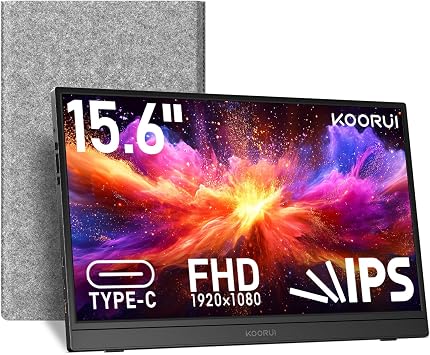
KOORUI's 15.6-inch model is a good fit for a remote worker who has a normal desk most days but does not want a permanent desktop monitor. Amazon lists a FHD 1080p IPS display, USB-C and Mini HDMI, built-in speakers, and a kickstand. That kickstand is especially useful when the second screen has to sit beside a laptop rather than live on a monitor arm.
Buy it if your week mixes a home office with occasional travel and you want the panel to stand on its own beside a keyboard. The USB-C and Mini HDMI options can also make laptop changes less disruptive.
Skip it if color-critical visual review is part of your work. This is a practical second workspace, not the clearest choice when more resolution and wider color coverage are the decision drivers.
ARZOPA A1 portable monitor for a carry-on work setup
Check the ARZOPA A1 portable monitor on Amazon

The ARZOPA A1 is aimed at the remote worker who needs the second display to stay easy to carry. Its Amazon listing describes a 15.6-inch FHD 1080p IPS panel in an ultra-slim format with a kickstand, USB-C, and HDMI. Those basics are enough for a laptop-based consultant who changes desks often and wants a second document or task board without adding a bulky dock.
Buy it if your work setup needs to fit in one bag and your second screen is mainly for writing, spreadsheets, web tools, and meeting notes. The kickstand removes the need to find something to lean the display against in a hotel or shared office.
Skip it if you need a larger canvas for long sessions or a panel built around wide color coverage. A slim general-purpose screen is a tradeoff, not a replacement for a fixed work display.
Upperizon 15.6-inch 4K portable monitor for detailed visual work
Check the Upperizon 15.6-inch 4K portable monitor on Amazon

Upperizon is the specialist choice in this group. The Amazon listing specifies a 15.6-inch 4K UHD panel, 144% sRGB, 60 Hz, HDR, USB-C, HDMI, a full cover, speakers, and VESA compatibility. That makes it worth considering for remote designers, marketers, and creators who review detailed work, keep dense layouts on screen, or want the option to mount the display at a more settled desk.
Buy it if sharper text and visual detail help you do paid work, and your laptop can run a 4K external display comfortably. The cover and VESA support add flexibility when the panel moves between travel and a more stable home-office station.
Skip it if most of your work happens in docs, chat, and browser tabs. A FHD panel usually costs less effort to run and remains easier to read at comfortable scaling on a small screen.
A practical setup for remote work
Set the portable monitor beside the laptop rather than directly behind it. That keeps your primary camera near the screen you use most during calls. For interview practice or client meetings, a dedicated webcam can also prevent the low-angle view that comes from looking down at a laptop. Our best webcams for remote work guide covers that side of the setup.
Keep the cable plan modest. One good USB-C cable, one HDMI cable when your laptop needs it, and a compact hub are usually more useful than a large collection of adapters. Digital nomads who schedule across countries can also keep meeting times straight with the time zone converter before they set up in a new location.
Spend where the work benefits
Put budget toward the feature that changes your actual work. A standard 1080p monitor can be enough for support, operations, writing, recruiting, and development tasks that need a second window. Detailed visual work may justify 4K and expanded color coverage, while a frequent traveler may value a simple stand and carry case more than extra specs.
Use the salary calculator to frame a work-gear budget around the role and compensation you are targeting. That keeps a portable monitor as a practical business expense rather than an impulse purchase.
Frequently asked questions
Are portable monitors useful for remote work
Yes, when a second screen removes a regular bottleneck. They are especially useful for keeping a meeting, reference document, inbox, or project board visible without constantly switching laptop windows. A larger fixed monitor is usually better for a permanent desk, but a portable model is much easier to move between work locations.
Does USB-C always work with a portable monitor
No. The USB-C port needs video output support, often called DisplayPort Alt Mode, or Thunderbolt support. Check the laptop documentation before you rely on a one-cable setup. HDMI can be a reliable alternative, but may need separate power for the monitor.
Is 1080p enough for a portable monitor
For most remote work, yes. Full HD is a comfortable baseline for docs, chat, browser work, spreadsheets, and video calls at a 15.6-inch size. A 4K panel is more useful when you handle detailed design work, visual review, or dense information that benefits from extra pixels.
Can a portable monitor work with a laptop stand
Yes. Place the portable monitor beside the raised laptop and keep enough depth for a separate keyboard and mouse. Test the view in your meeting app too, since a laptop camera can end up too high or off to one side once the screen is raised.
Which portable monitor is best for remote work
The MNN 15.6-inch FHD model is the best simple second-screen choice in this list because it combines USB-C one-cable support, HDMI, a smart case, and a FHD IPS panel. The Upperizon 4K model is a better match for remote visual work, while the ARZOPA A1 favors a compact travel setup.
The next useful screen
A portable monitor should make a remote workday calmer, not add more cables and decisions. Pick the screen that fits your laptop connection and the work you need beside it, test it before an important call, then browse remote jobs with a setup that is ready for the next opportunity.
Publishing Articles or Documentation? Remove AI Slop.
Remove repetitive AI filler phrases, robotic patterns, and AI slop to make your content human, engaging, and original.
Applying for Senior Full-Stack Engineer Roles?
Boost your callback rate with our 100% free ATS-optimized resume template tailored specifically for remote Senior Full-Stack Engineer positions.
Remote Senior Full-Stack Engineer Resume Template
Engineered specifically for distributed engineering teams. Highlights asynchronous PR reviews, system scalability, and cloud microservices architecture.
ATS Keyword Scanner
Check your resume against remote job descriptions to find missing keywords and boost your score.
Tailored Cover Letter
Generate a personalized, high-converting remote cover letter emphasizing async communication.