Best Travel Routers for Digital Nomads

The best travel routers for digital nomads make an unfamiliar connection easier to use across a laptop, phone, and work gear. They can save a hotel Wi-Fi login for your devices, give your work kit its own network, and add wired ports where an unstable call or large upload makes Wi-Fi alone feel risky. This guide compares five current Amazon options for freelancers, contractors, and remote employees who need a compact router for hotels, coworking spaces, client sites, and short-term rentals.
Quick picks for travel work
| Travel router | Best for | Why it works for remote work | Skip it if |
|---|---|---|---|
| GL.iNet Beryl AX | Most digital nomads | Wi-Fi 6, a 2.5G WAN port, gigabit LAN, and USB 3.0 cover a serious laptop-and-call setup | You want the simplest possible interface or Wi-Fi 7 |
| GL.iNet Slate 7 | Premium travel setup | Wi-Fi 7, a 2.5G port, and a small screen give frequent travelers more headroom and quick controls | You only need a low-cost backup router |
| TP-Link Roam 7 | Newer Wi-Fi 7 choice | Wi-Fi 7, 2.5G networking, USB 3.0, and multiple connection modes suit a newer laptop kit | You need a proven OpenWrt-style control panel |
| GL.iNet Opal | Wired hotel desk | Three gigabit ports let a laptop and a second wired device share one travel network | Your laptop setup needs Wi-Fi 6 or Wi-Fi 7 |
| GL.iNet Mango | Small backup kit | A pocket-sized router with two Ethernet ports gives a basic work device its own connection | You need fast dual-band Wi-Fi for heavy calls and uploads |
The best travel routers for digital nomads
GL.iNet Beryl AX for most digital nomads
Check the GL.iNet Beryl AX on Amazon
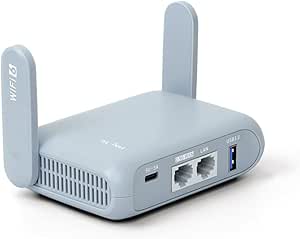
The GL.iNet Beryl AX is the strongest all-round choice for a person who works from different places but still carries a serious laptop setup. Its Amazon listing specifies Wi-Fi 6, dual-band wireless, a 2.5G WAN port, gigabit LAN, and USB 3.0. That combination gives a remote worker useful options when a hotel provides Ethernet, a phone is the fallback connection, or a client call needs the laptop on a separate network from personal devices.
Buy it if you need one router that can handle a laptop, phone, headset, and occasional wired connection without treating travel networking as an afterthought. Skip it if a very small backup router is enough or you specifically want Wi-Fi 7. The tradeoff is that its feature set asks for a little setup time before the first trip, especially if you plan to use VPN or guest-network controls.
GL.iNet Slate 7 for a premium travel setup
Check the GL.iNet Slate 7 on Amazon

The GL.iNet Slate 7 is the premium pick for a remote worker who travels often and wants current wireless hardware in a small unit. Amazon lists Wi-Fi 7, a 2.5G connection, a touchscreen, and quick controls for VPN or AdGuard. The screen can be useful when a contractor is moving between a hotel room, a coworking desk, and an airport lounge and wants to confirm the router state without opening a laptop.
Buy it if your travel kit includes newer Wi-Fi gear and you value a quick status check before an important meeting. Skip it if you are using ordinary hotel connections and want the lowest-cost path to a private device network. Its main tradeoff is value: Wi-Fi 7 will not make a slow hotel uplink fast, so the extra hardware matters most when the local connection and your devices can use it.
TP-Link Roam 7 for a newer Wi-Fi 7 option
Check the TP-Link Roam 7 on Amazon

The TP-Link Roam 7 is a good fit for a remote worker who wants a current travel router from a familiar networking brand. The Amazon listing describes Wi-Fi 7, a 2.5G port, USB 3.0, and router, hotspot, bridge, range-extender, access-point, and client modes. Those modes matter when a consultant has to adapt to a hotel portal one night and a wired apartment connection the next.
Buy it if you want a compact Wi-Fi 7 router with flexible connection modes for mixed travel. Skip it if you prefer the deeper OpenWrt-oriented controls found on the GL.iNet picks or if your work gear is all Wi-Fi 5 or older. The key tradeoff is that a newer standard helps most inside your own short-range network; it cannot fix a poor upstream connection from the hotel or venue.
GL.iNet Opal for a wired hotel desk
Check the GL.iNet Opal on Amazon
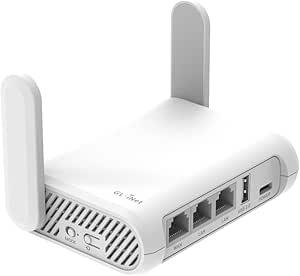
The GL.iNet Opal is the practical choice for a worker who benefits from more than one Ethernet port on the road. Amazon lists AC1200 dual-band Wi-Fi, three gigabit ports, OpenWrt, OpenVPN and WireGuard support, and a 145-gram weight. The ports are useful when a rental has a reliable wired jack and you want the laptop or a compact dock on Ethernet while other work devices stay on your private Wi-Fi.
Buy it if wired flexibility is more useful than the newest Wi-Fi version. Skip it if your calls and uploads depend on Wi-Fi 6 or Wi-Fi 7 performance, or if you only need a simple single-device backup. Its tradeoff is age: the hardware is capable for normal document work and calls, but it is not the forward-looking option in this group.
GL.iNet Mango for a compact backup kit
Check the GL.iNet Mango on Amazon

The GL.iNet Mango is the small backup pick for a freelancer who wants a separate work network without a larger router in every bag. Its Amazon listing includes two Ethernet ports, USB 2.0, OpenWrt, OpenVPN and WireGuard support, and a setup panel for public or hotel Wi-Fi. It can be enough for a laptop, a phone, and a quiet work session when the priority is keeping the kit light.
Buy it if size and a low-stakes backup role matter more than top wireless speed. Skip it if video calls, cloud backups, and several devices compete for bandwidth throughout the day. The tradeoff is clear: its single-band Wi-Fi is less flexible in crowded buildings, so it is best treated as a light travel tool rather than the centerpiece of a high-demand remote office.
What matters for remote work travel
Start with the upstream connection
A travel router organizes the connection you are given. It does not create bandwidth where none exists. Check the hotel or coworking connection before a client presentation, large file transfer, or live interview. Ethernet can be worth using when the room offers it, but test it first and keep a phone hotspot ready for a critical call.
Match the router to your work devices
A lightweight kit with one laptop and one phone can use a basic router. A consultant who carries a laptop, portable monitor, USB-C hub, headset, and a second phone benefits from dual-band Wi-Fi and a wired port. Our USB-C hubs for remote workers guide can help you keep the laptop side of that setup manageable.
Treat VPN support as a work choice
VPN support may be helpful for a company policy or a client environment, but it can also reduce connection speed. Check whether your employer requires a specific app or protocol before you buy a router around VPN features. Do not assume a router-based VPN replaces the security steps required by your company.
Plan for power and cables
Most travel routers need a USB power source and at least one short cable. Pack the cable you will actually use, then test the complete kit at home before a trip. A multi-port charger can keep the router, laptop, phone, and headset powered from one outlet; our GaN chargers for remote work travel guide compares options for that job.
A simple buying decision
Choose the Beryl AX when you want the most balanced mix of Wi-Fi 6, 2.5G networking, and travel-friendly ports. Choose the Slate 7 or Roam 7 when Wi-Fi 7 and a newer work kit justify the higher spend. Choose the Opal when wired hotel or apartment connections matter. Choose the Mango when a small backup router is all you need.
Before spending more, set a budget for the whole travel kit rather than the router alone. The salary calculator can help you frame that purchase against an expected remote-work income, while the timezone converter is useful when client calls move across locations.
FAQ
Can a travel router help with hotel Wi-Fi
Yes. A travel router can connect to the hotel network and then share a separate connection with your work devices. That can reduce the number of devices that need to sign into a hotel portal, but it does not guarantee faster service or bypass hotel rules.
Do digital nomads need Wi-Fi 7
No. Wi-Fi 6 is still a sensible choice for many laptop-based remote setups. Wi-Fi 7 makes more sense when your devices support it and you want a router that will stay in your kit for several years. The upstream hotel or coworking connection usually has a bigger effect on a call than the Wi-Fi generation alone.
Is Ethernet worth packing for remote work travel
It can be. A short Ethernet cable can give a laptop or router a steadier connection in a hotel room or serviced apartment with a working wired jack. Test it before a meeting, since some locations disable or do not maintain those ports.
What else should a remote worker pack with a travel router
Keep the kit practical: the router, its USB power cable, a short Ethernet cable, a compatible wall charger, and a phone hotspot plan for backup. People who work across borders can also use the Working Nomads job board to find remote roles that fit the places and hours they can realistically support.
Publishing Articles or Documentation? Remove AI Slop.
Remove repetitive AI filler phrases, robotic patterns, and AI slop to make your content human, engaging, and original.
Applying for Senior DevOps & Cloud Engineer Roles?
Boost your callback rate with our 100% free ATS-optimized resume template tailored specifically for remote Senior DevOps & Cloud Engineer positions.
Remote DevOps & Cloud Engineer Resume Template
Tailored for Site Reliability Engineers and DevOps architects managing infrastructure as code and automated deployment pipelines.
ATS Keyword Scanner
Check your resume against remote job descriptions to find missing keywords and boost your score.
Tailored Cover Letter
Generate a personalized, high-converting remote cover letter emphasizing async communication.