Best Ergonomic Keyboards for Remote Work
The best ergonomic keyboards for remote work help you type through client notes, planning docs, code reviews, and long inbox sessions with a layout that better matches the way your hands rest at a desk. The right choice is less about novelty and more about the details that shape every workday: split keys, palm support, connection options, key feel, and the space your laptop setup can spare.
Remote work adds a few practical questions. A freelancer may switch between a personal laptop and a client machine. A contractor may need a wired keyboard for a managed computer. Someone with a small home desk may care more about keeping the mouse close than about a full number pad. This guide focuses on those work choices, not on gaming features or flashy lighting.
Quick picks for remote work
| Ergonomic keyboard | Best for | Remote-work fit | Skip it if |
|---|---|---|---|
| Logitech Ergo K860 | Most fixed home desks | Curved split layout, wrist rest, Bluetooth, and receiver support suit a laptop or desktop desk | You need a compact keyboard for frequent travel |
| Logitech Wave Keys | Small desks and several devices | Compact wave layout helps keep the mouse close and Easy-Switch supports a laptop, tablet, and phone | You want a traditional split-key shape or a number pad |
| Nulea Ergonomic Split Wireless Keyboard | Value-minded multi-device work | Bluetooth and 2.4 GHz wireless give a home desk more connection choices | You need mature remapping software or a wired-only keyboard |
| Perixx PERIBOARD-512B | A reliable wired desk | USB connection and longer-travel keys suit a steady Windows or Mac workstation | Quiet shared spaces and travel are priorities |
| Incase Sculpt Ergonomic Keyboard | Windows-heavy desk work | Split keyset, detachable number pad, and dedicated Windows shortcuts fit spreadsheet and admin work | You need a compact, grab-and-go keyboard |
What changes the keyboard choice
A keyboard is only ergonomic when it fits the work you actually do. A curved or split layout can keep the hands from meeting at a hard inward angle, yet it also changes familiar key positions. That adjustment is small for some people and disruptive for others. Give any new shape enough ordinary work time before deciding whether it belongs at your desk.
Keyboard width affects the mouse position
A compact keyboard can free enough room to place a mouse closer to your body. That matters when you spend the day moving between documents, project boards, spreadsheets, and browser tabs. A full-size board can still be the better choice when you enter numbers often, but it asks for more desk width. Pair a raised laptop with a separate keyboard only when there is room for both the keyboard and pointing device.
Connection options should match your work computer
Bluetooth keeps a port open on a thin laptop. A USB receiver can be simpler on a desktop or a company device where Bluetooth is restricted. Wired USB removes pairing and charging from the day, but it gives you another cable to manage. Check the ports and operating system on every device you use before you choose a keyboard with a receiver.
Comfort needs more than one accessory
No keyboard fixes a desk that is too high, a chair that leaves your shoulders raised, or a laptop screen that pulls your gaze down. Keep the board close enough that your elbows can rest near your sides. A keyboard with a palm rest can feel more settled on a long workday, but it should not encourage you to reach forward for the mouse.
Our ergonomic keyboard picks
Logitech Ergo K860 for most fixed remote desks
Check the Logitech Ergo K860 on Amazon

The Logitech Ergo K860 is the strongest overall choice for a remote worker who types most days from one home desk. Its Amazon listing describes a curved split keyframe, scooped keys, a pillowed wrist rest, and three tilt positions. It also supports Bluetooth or the included USB receiver, which is useful when a freelancer needs to move between a work laptop and a second computer without replacing the whole desk setup.
Buy it if you want a full-size keyboard for writing, documents, spreadsheets, and project work, while keeping a choice between Bluetooth and a receiver. The quiet keys and broad Windows and Mac support make it a practical desk-first pick.
Skip it if your keyboard goes into a backpack often. Its size and built-in wrist rest suit a settled desk better than a coworking rotation or a small carry-on setup.
Logitech Wave Keys for a smaller remote desk
Check the Logitech Wave Keys on Amazon

Logitech Wave Keys is a sensible pick when desk width is the real problem. Its wavy layout and cushioned palm rest aim to keep the hands in a less cramped typing position, while its compact width lets the mouse sit closer. The listing also includes Bluetooth, a Logi Bolt receiver, and Easy-Switch support for up to three devices across Windows, macOS, iPadOS, and ChromeOS.
Buy it if you use a laptop at a narrow desk, switch between a computer and tablet, or want a tidy keyboard that does not push the mouse far to the side. It is especially useful for remote workers who use a separate mouse but do not need a number pad every hour.
Skip it if a true split keyboard is your goal or your work depends on frequent numeric entry. The wave shape is gentler than a conventional rectangular board, but it is not the same as separate left and right key zones.
Nulea Ergonomic Split Wireless Keyboard for flexible device work
Check the Nulea Ergonomic Split Wireless Keyboard on Amazon
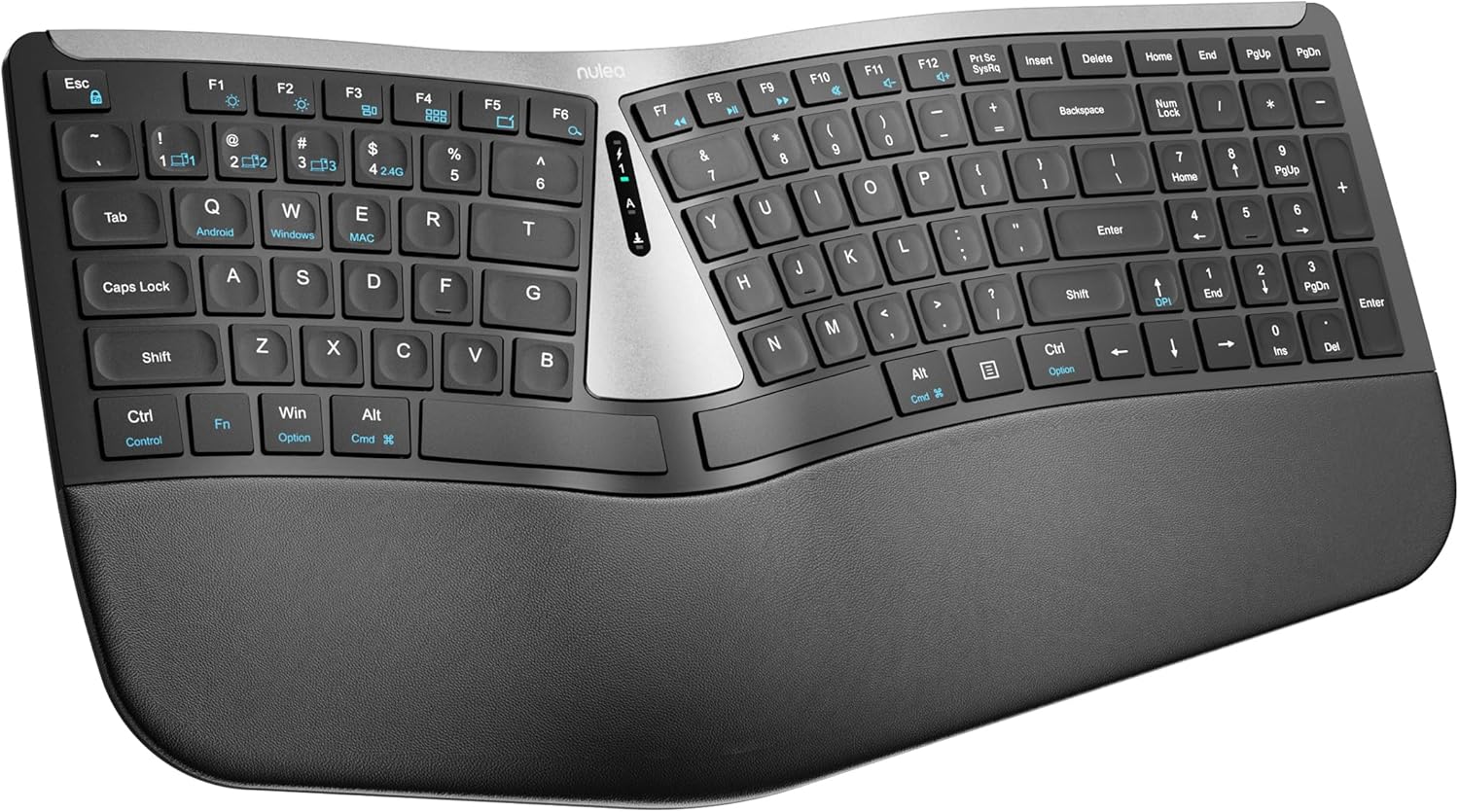
Nulea's split wireless keyboard is the value pick for a remote worker who needs connection options without paying for a premium brand ecosystem. The Amazon listing calls out a split layout, a cushioned palm rest, scissor-switch keys, Bluetooth, 2.4 GHz wireless, and rechargeable power. That combination works well for a consultant who moves between a client laptop and a personal computer at the same desk.
Buy it if Bluetooth and a receiver give you useful backup choices, and you want a familiar full-width keyboard with a built-in rest. Its scissor keys should feel closer to many laptop keyboards than a tall mechanical board.
Skip it if you need a wired keyboard for a locked-down work machine or depend on advanced shortcut remapping. Its main appeal is practical wireless flexibility, not a deep software setup.
Perixx PERIBOARD-512B for a wired work station
Check the Perixx PERIBOARD-512B on Amazon

The Perixx PERIBOARD-512B is the simple choice for a fixed remote desk where a cable is an advantage. Its Amazon listing notes a one-piece split layout, integrated wrist rest, USB connection, curved key rows, and longer key travel with tactile feedback. That is a useful mix when a company laptop has strict wireless settings or when you would rather avoid battery and pairing checks before a client call.
Buy it if you work from the same desk most days and prefer a direct USB connection. The deeper key feel can suit long stretches of written work, support tickets, or data entry where a laptop keyboard feels too shallow.
Skip it if you work near sleeping family, share a quiet coworking room, or travel often. The key travel and wired connection are strengths at a steady desk, but they make this a less discreet and less portable choice.
Incase Sculpt Ergonomic Keyboard for Windows desk tasks
Check the Incase Sculpt Ergonomic Keyboard on Amazon

The Incase Sculpt Ergonomic Keyboard is a strong fit for a Windows-focused remote desk where a separate number pad is useful but does not need to stay attached. Its Amazon listing describes a domed split keyset, cushioned palm rest, removable elevator with reverse tilt, detachable number pad, and Windows shortcuts for Start, Back, and screen snipping. That layout can make admin, finance, scheduling, and document work easier to organize around the space you have.
Buy it if your work includes forms, spreadsheets, screen captures, and daily Windows navigation. The detachable number pad gives you a little more control over where the mouse sits when you are not entering numbers.
Skip it if you mainly work from a Mac, need the lightest travel option, or want the simplest keyboard to replace at short notice. Its layout is built around a more settled Windows workflow.
Build a desk that supports the keyboard
Start with screen height, then decide where the keyboard and mouse can sit without forcing a reach. One of our best laptop stands for remote work can raise a laptop display, but it also makes a separate keyboard and mouse more important. A remote-work ergonomic mouse can keep the pointing side of the desk from becoming the next source of strain.
Ports matter when a laptop also powers a monitor, camera, and storage drive. A suitable USB-C hub for remote workers can make room for a receiver or wired keyboard without turning the desk into a cable pile. Use the salary calculator if you are setting a realistic gear budget around a remote role rather than buying every accessory at once.
Frequently asked questions
What makes a keyboard ergonomic
An ergonomic keyboard changes the layout, angle, palm support, or key position to better suit a relaxed typing posture. Common features include a split keyset, a curved or wave shape, tilt adjustment, and a wrist rest. The useful choice is the one that matches your hands, desk, and work computer.
Do remote workers need a split keyboard
No. A split or curved keyboard can be useful when a standard flat board feels cramped during long typing sessions, but it is not required for a productive home office. A compact board, a lower desk surface, or a better mouse position may matter more for your own setup.
Is Bluetooth or a USB receiver better for remote work
Bluetooth is helpful when laptop ports are scarce. A receiver can be easier on a desktop or a work computer with restricted Bluetooth. A keyboard that supports both gives a remote worker more options when the desk or device changes.
Are ergonomic keyboards good for laptop work
They can be, especially when the laptop is on a stand or connected to a monitor. The key check is whether the keyboard, mouse, and display can all sit at a workable height and distance. A keyboard alone cannot correct a screen that is too low or a desk that is too crowded.
Which ergonomic keyboard is best for remote work
The Logitech Ergo K860 is the best fit for many fixed remote desks because it combines a curved split layout, palm support, Bluetooth, and a USB receiver. Logitech Wave Keys suits smaller desks, while Nulea, Perixx, and Incase each serve a more specific device or work-station need.
Choose for the work you repeat
The best ergonomic keyboard for remote work should make a normal day feel less fussy, not give you another system to manage. Match the layout and connection to the desk you use most, then browse remote jobs with a setup that supports the work you want to do next.
Publishing Articles or Documentation? Remove AI Slop.
Remove repetitive AI filler phrases, robotic patterns, and AI slop to make your content human, engaging, and original.
Applying for Executive Virtual Assistant Roles?
Boost your callback rate with our 100% free ATS-optimized resume template tailored specifically for remote Executive Virtual Assistant positions.
Remote Executive Virtual Assistant Resume Template
Engineered for high-performing assistants managing executive inboxes, calendars across time zones, and confidential business ops.
ATS Keyword Scanner
Check your resume against remote job descriptions to find missing keywords and boost your score.
Tailored Cover Letter
Generate a personalized, high-converting remote cover letter emphasizing async communication.