2 Best Desk Lights for Video Calls
Two desk lights stand out for different remote-work setups. Elgato Key Light Neo is the compact choice for a monitor-based workstation, while Elgato Key Light Air MK.2 gives a fixed desk a larger panel, a clamp stand, and more available output. Neither is automatically better. Your monitor, desk edge, power source, and distance from the camera determine which design makes sense.
This guide compares exact, distinct models for remote interviews, client meetings, online teaching, and regular team calls. We have not tested these lights ourselves. The recommendations come from current manufacturer specifications, setup documentation, model-specific media, and verified product destinations.
Quick comparison
| Pick | Best for | Maximum stated output | Mount | Main limitation |
|---|---|---|---|---|
| Elgato Key Light Neo Black with Monitor Mount | Small desks and close webcam framing | 1,000 lumens with a suitable 3A power supply | Monitor mount | Full output depends on the power source |
| Elgato Key Light Air MK.2 with Desk Mount | Fixed desks, wider framing, and more lighting headroom | About 2,100 lumens with at least 27W input | Clamp desk stand | Larger setup and no power adapter in the box |
Best compact pick
Elgato Key Light Neo Black with Monitor Mount
The Key Light Neo is the cleaner fit when your webcam sits on a monitor and the desk has little spare surface area. The light is 150 mm wide and weighs 246 g, so it is much smaller than a traditional panel on a stand. Its included monitor mount puts the source close to eye level without using the desk edge.
Elgato rates the Neo at 400 lumens from a 4.5W USB-A connection, 700 lumens from a 7.5W USB-C connection, and 1,000 lumens with a 3A supply. That power-dependent range matters more than the maximum number. A remote worker who connects it to an ordinary USB-A port should expect less output than someone using a suitable external supply. Its 2,900–7,000 K color range and CRI above 94% let you adjust from warm to cool light and aim for more natural skin tones on camera.
Who should buy it: remote workers who sit close to one monitor, want a clear face light for calls, and cannot give up desk space.
Who should skip it: laptop users with a light or flexible lid, people whose webcam already occupies the best mounting point, or anyone who needs to illuminate a broad scene rather than one face.
Practical tradeoff: the compact mount is the reason to choose it, but that same placement gives you less freedom to move the light off-axis. Check monitor thickness, webcam clearance, cable routing, and available USB power before ordering.

Best for a fixed desk
Elgato Key Light Air MK.2 with Desk Mount
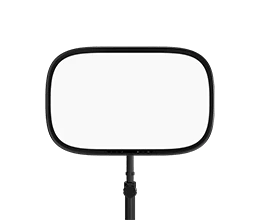
The Key Light Air MK.2 is the more flexible choice when you have a permanent workstation and need greater lighting headroom. Its 319 x 207 mm panel is substantially larger than the Neo, and the included clamp stand adjusts from 60 to 88 cm high. That lets you place the source above and slightly beside the camera instead of directly on the monitor.
Elgato lists output at about 420 lumens below 7.5W, 840 lumens from 7.5W to under 15W, 1,260 lumens from 15W to under 20W, 1,680 lumens from 20W to under 27W, and roughly 2,100 lumens at 27W or more. It uses USB-C power, supports touch controls plus USB or Wi-Fi control, and has the same stated 2,900–7,000 K range and CRI above 94%.
Who should buy it: consultants, instructors, creators, and remote professionals with a stable desk who want to position a larger light independently of the monitor.
Who should skip it: frequent travelers, workers who cannot clamp equipment to their desk, or anyone expecting a complete full-output setup without an additional compatible power adapter.
Practical tradeoff: the larger panel and adjustable stand make placement easier and provide more possible output, but the light alone weighs 735 g and the desk clamp needs an edge up to about 6 cm thick. Elgato states that a power adapter is not included, so factor the correct USB-C PD source into the setup rather than assuming any laptop port will deliver maximum brightness.
How to choose the right light
Start with placement
A desk light works best when it raises the brightness on your face without forcing you to stare into a harsh source. For one-light setups, place the light near camera height and slightly to one side. If the light reflects in glasses, move it higher or farther off-axis before increasing brightness. A larger panel can usually sit farther away and still cover the face evenly; a compact monitor light is easier to keep close.
The Neo is simpler when the monitor is the natural mounting point. The Air MK.2 gives you more placement freedom, but only if the desk has a suitable clamp edge and room behind the screen. Before buying either one, make a quick sketch of your camera, monitor, chair, nearest outlet, and cable path.
Match output to distance
Maximum lumens do not tell you how your video will look. Distance, room light, camera exposure, wall color, and whether daylight changes during the call all matter. A close monitor light may be enough for a head-and-shoulders frame. A larger panel is more useful when the camera is farther away, your framing is wider, or you need to balance a bright window.
Both products vary their available output according to power. Check the port or adapter you plan to use. If you depend on a laptop dock, confirm its per-port power rather than its total advertised wattage.
Check the camera before buying more gear
Try free adjustments first. Face a window during daytime, avoid a bright window directly behind you, clean the webcam lens, and use the camera app to check exposure. If interviews are the main reason for upgrading, combine better lighting with the site's remote interview practice tool so your setup and your answers are ready together.
Lighting cannot fix poor camera placement. Keep the lens near eye level and frame the background before deciding how much output you need. If the webcam itself is the weak point, compare the best webcams for remote work before spending on a stronger light.
What we verified
We checked each model as a separate product, not as a color or pack-size variation. Both purchase destinations contain the required Working Nomads affiliate tag and returned HTTP 200 during the November 19, 2026 verification. Amazon presented an automated-access challenge during the check, so we do not claim current price, stock, seller, or delivery. Confirm those details at checkout.
The product photographs are exact-model images from Elgato's official Media Room. The Neo image shows the black light with its monitor mount. The Air MK.2 image shows the larger MK.2 panel on its stand. Both image URLs loaded successfully, and the source, model, ASIN, verification date, and permitted-use basis are recorded with the corresponding recommendation.
Manufacturer specifications were checked against the Key Light Neo manual, the Key Light Air MK.2 product page, and the Elgato Media Room. Specifications and product configurations can change, so confirm the exact model and included accessories before purchase.
Bottom line
Choose Key Light Neo when desk space is tight, the monitor can safely support the mount, and your camera framing stays close. Choose Key Light Air MK.2 when you have a fixed clamp-friendly desk, want more placement control, and can supply the appropriate USB-C power. The best desk light for video calls is the one that fits your physical setup and power source, not simply the model with the highest maximum output.
Publishing Articles or Documentation? Remove AI Slop.
Remove repetitive AI filler phrases, robotic patterns, and AI slop to make your content human, engaging, and original.
Applying for Growth Marketing & SEO Specialist Roles?
Boost your callback rate with our 100% free ATS-optimized resume template tailored specifically for remote Growth Marketing & SEO Specialist positions.
Remote Growth Marketing & SEO Specialist Resume Template
Built for performance marketers and organic search experts scaling visitor-to-customer acquisition funnels.
ATS Keyword Scanner
Check your resume against remote job descriptions to find missing keywords and boost your score.
Tailored Cover Letter
Generate a personalized, high-converting remote cover letter emphasizing async communication.