How to Format a Cover Letter
Why Formatting Matters
A cover letter should feel easy to read before the first sentence even lands. Clean spacing, clear sections, and a professional greeting help the reader move through it without friction.
Good formatting will not save weak content, but weak formatting can make strong content harder to notice.
Professional Formatting Baseline
Keep the design simple. CareerOneStop's cover letter guidance gives job seekers a baseline for using cover letters as part of a focused application.
Use these basics:
- Alignment: Left-align the text.
- Margins: Use clean, even margins.
- Spacing: Keep paragraphs short and add space between them.
- Typography: Use a standard business font in a readable size.
- File format: Follow the employer's instructions. Use PDF when a fixed-layout document is allowed.
Structure the Content
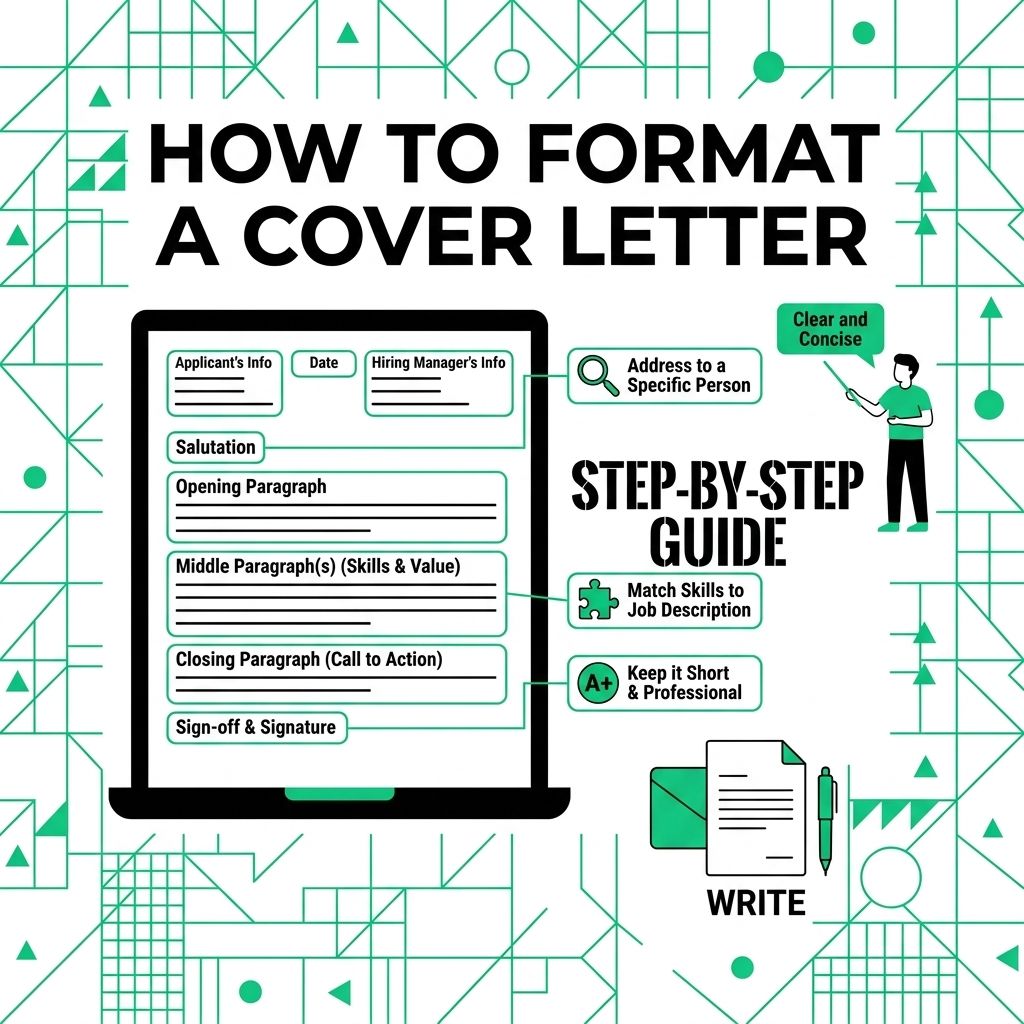
Use a predictable structure so the employer can quickly see who you are, why you are writing, and why the role fits.
Header component
Put your contact details at the top when you are attaching a document.
- Name: Use your full name.
- Location: City and state or region is usually enough.
- Phone: Use a reliable number.
- Email: Use a professional email address.
- Relevant link: Add a portfolio, LinkedIn profile, or work sample when it helps.
Employer details block
For a formal letter attachment, include the date and employer details when you have them. For an email cover letter, skip the full address block and start with the greeting.
Salutation
Use the hiring manager's name when you can verify it. Use "Dear Hiring Manager" when you cannot find a name.
Write the Core Paragraphs
The letter should connect your background to the role, not repeat the whole resume.
First paragraph
Name the role and give the reader one clear reason you fit. Mention a referral if you have one and the person gave permission.
Proof paragraph
Use one or two examples that match the job posting.
Final paragraph
Thank the reader and state that you would welcome a conversation. Keep it direct and polite.
Sign-off
Use a professional close such as "Sincerely" or "Best regards." Add your full name below it.
Email Formatting Adjustments
Email cover letters should be shorter and cleaner.
- Subject line: Include the job title and your full name.
- Contact details: Put your phone number and email below your sign-off.
- Header removal: Skip the full letter header and employer address block.
Format the letter so the reader can follow it quickly. Then make every paragraph earn its place.
For a related Working Nomads article, read how to write a thank you note to a remote coworker for managers before you decide your next step.
What to Read Next
Read how to write a salary increase letter if you want a related next step on job search letters.
Use what is a letter of intent for managers when you need more context before your next decision.
Publishing Articles or Documentation? Remove AI Slop.
Remove repetitive AI filler phrases, robotic patterns, and AI slop to make your content human, engaging, and original.
Applying for Senior Content Strategist & Copywriter Roles?
Boost your callback rate with our 100% free ATS-optimized resume template tailored specifically for remote Senior Content Strategist & Copywriter positions.
Remote Content Marketer & Copywriter Resume Template
Crafted for writers who produce high-converting long-form guides, B2B case studies, and email nurture sequences for distributed teams.
ATS Keyword Scanner
Check your resume against remote job descriptions to find missing keywords and boost your score.
Tailored Cover Letter
Generate a personalized, high-converting remote cover letter emphasizing async communication.